关于python生成gif图

环境:Win10 x64 Python3.5/Pythom2.7

由于网上各种方案鱼龙混杂,正好顺带测试下。

(成功的方法在最下面,着急的可以直接看)


使用imageio库(py3)

1
2
3
4
5
6
7
8
9
10
import matplotlib.pyplot as plt
import numpy
import imageio,os
images = []
filenames=sorted((fn for fn in os.listdir('.') if fn.endswith('.png')))
for filename in filenames:
images.append(imageio.imread(filename))
imageio.mimsave('movie.gif', images)
exit()

效果还是有的,然而有严重的编码错误。。生成的gif图一大片全是白色,剩下的好像也乱码了


使用images2gif.py

如果在py3下使用,会报错
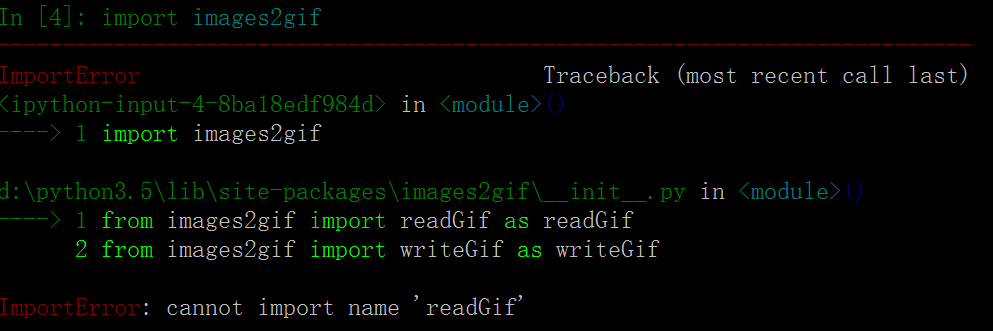
1

原因是这个库还不支持py3(然而为什么不支持我还能Pip intall下来???)

改用2.7。下面这个是逆转一个GIF图的代码。

1
2
3
4
5
6
7
8
9
10
11
from PIL import Image, ImageSequence
import sys, os
#filename = sys.argv[1]
filename='1.gif'
im = Image.open(filename)
original_duration = im.info['duration']
frames = [frame.copy() for frame in ImageSequence.Iterator(im)]
frames.reverse()
from images2gif import writeGif
writeGif("reverse_" + os.path.basename(filename), frames, duration=original_duration/1000.0, dither=0)

运行果然报错(我好像拥有了蜜汁第六感)

1
2
3
4
5
6
7
8
> File "TEST.py", line 11, in <module>
> writeGif("reverse_" + os.path.basename(filename), frames, duration=original_duration/1000.0, dither=0)
> File "D:\Python27\lib\site-packages\images2gif\images2gif.py", line 593, in writeGif
> gifWriter.writeGifToFile(fp, images, duration, loops, xy, dispose)
> File "D:\Python27\lib\site-packages\images2gif\images2gif.py", line 449, in writeGifToFile
> fp.write(globalPalette)
>TypeError: argument 1 must be string or buffer, not None
>

谷歌查一下。。果然有坑。。

In images2gif.py change line 200:

1
2
3
>for im in images:
> palettes.append( getheader(im)[1] )
>

>

to

1
2
3
>for im in images:
> palettes.append(im.palette.getdata()[1])
>

当然这里200行不准确,我的是在第425-426行。。。

改完之后很神奇的Exit 0了。。。打开新生成的gif一看还是有乱码。。。

值得一提的是,image2gif的作者说这个库效率低下而且调色板有问题,强力推荐用新开发的imageio的库,也就是①的方法。。果然相同作者写出来的库跑出来的错误都是类似的……

值得一提的是,只要使用了image2gif这个库(通常是使用其中的.wirteGif函数)的代码,我的测试样例都会乱码。只不过具体情况有点差别。


使用ImageMagick

Well, now I’m using ImageMagick. I save my frames as PNG files and then invoke ImageMagick’s convert.exe from Python to create an animated GIF. The nice thing about this approach is I can specify a frame duration for each frame individually. Unfortunately this depends on ImageMagick being installed on the machine. They have a Python wrapper but it looks pretty crappy and unsupported. Still open to other suggestions.

嗯..调用exe文件。。我没试,有兴趣的可以试试

ImageMagick

gifbook-GifBook: 从视频和字幕文件生成 gif 动画!


使用gifmaker.py(Py2.7)

1
2
3
4
5
6
7
8
9
10
11
12
13
14
from PIL import Image,ImageSequence
import gifmaker,os
sequence = []
filenames=sorted((fn for fn in os.listdir('.') if fn.endswith('.PNG')))
im =[ Image.open(filename) for filename in filenames]
# im is your original image
#frames = [frame.copy() for frame in ImageSequence.Iterator([imm for immm in im])]
# write GIF animation
fp = open("out.gif", "wb")
gifmaker.makedelta(fp, im)
fp.close()

结果依然是报错了。。

1
2
3
4
5
6
7
8
9
10
11
12
13
Connected to pydev debugger (build 162.1967.10)
Traceback (most recent call last):
File "D:\PyCharm Community Edition 2016.2.3\helpers\pydev\pydevd.py", line 1580, in <module>
globals = debugger.run(setup['file'], None, None, is_module)
File "D:\PyCharm Community Edition 2016.2.3\helpers\pydev\pydevd.py", line 964, in run
pydev_imports.execfile(file, globals, locals) # execute the script
File "C:/Users/Administrator/Desktop/TEST/ga.py", line 14, in <module>
gifmaker.makedelta(fp, im)
File "C:/Users/Administrator/Desktop/TEST\gifmaker.py", line 78, in makedelta
for s in getheader(im) + getdata(im):
File "D:\Python27\lib\site-packages\PIL\GifImagePlugin.py", line 754, in getdata
ImageFile._save(im, fp, [("gif", (0, 0)+im.size, 0, RAWMODE[im.mode])])
KeyError: 'RGBA'

好像是色调空间的问题。。。没空折腾了。PASS


PIL库(Py2、3都支持)

无意中翻了下PIL官方文档,是支持Gif的。而且保存成gif格式也允许mulityImage.

果断试了下,成功了!

1
2
3
4
5
6
7
8
from PIL import Image, ImageSequence
import sys, os
#filename = sys.argv[1]
filenames=sorted((fn for fn in os.listdir('.') if fn.endswith('.PNG')))
im=Image.open('001.png')
print(filenames)
im.save('123.gif', save_all=True, append_images=[Image.open(filename) for filename in filenames],loop=5,duration=500)

得到的123.gif分析了下:

  1. 位深由origin的32位变成了8位,所以图像看起来有点.色差……回头看看能不能指定参数
  1. 总共6个文件,生成的gif也依次包括了6帧。但是如果im=Image.open('001.png') 这打开的不是第一个(头)帧的话,就会变成7帧。应该是PIL内部自动做了判断。
  2. 原始6个png文件大小(K)分别为:863、804、789、810、834、833,共计4933K。合成出来的gif大小为2.37MB。还不错。具体的格式编码没看过,所以也不能做进一步分析。
  3. http://www.pythonclub.org/modules/pil/convert-png-gif 说的比较详细 可以参考

 其他

下面是一些未经测试的方法。大家可以测试玩玩。

如何截取屏幕并生成GIF动画

http://blog.csdn.net/hackjames/article/details/6950837

moviepy 模块

如何用 Matplotlib 画 GIF 动图

Gifsicle的Python 封装